Performance Improvements
Timefold Solver Enterprise brings many performance improvements. These are shortly described here.
Faster shadow variables
| This feature is exclusive to Timefold Solver Enterprise Edition. |
Updates to shadow variables happen incrementally with Timefold Solver Enterprise. For models making intensive use of shadow variables, this should be visible as a serious performance improvement out-of-the-box.
This is enabled by default and doesn’t require any special considerations.
Node sharing
| This feature is exclusive to Timefold Solver Enterprise Edition. |
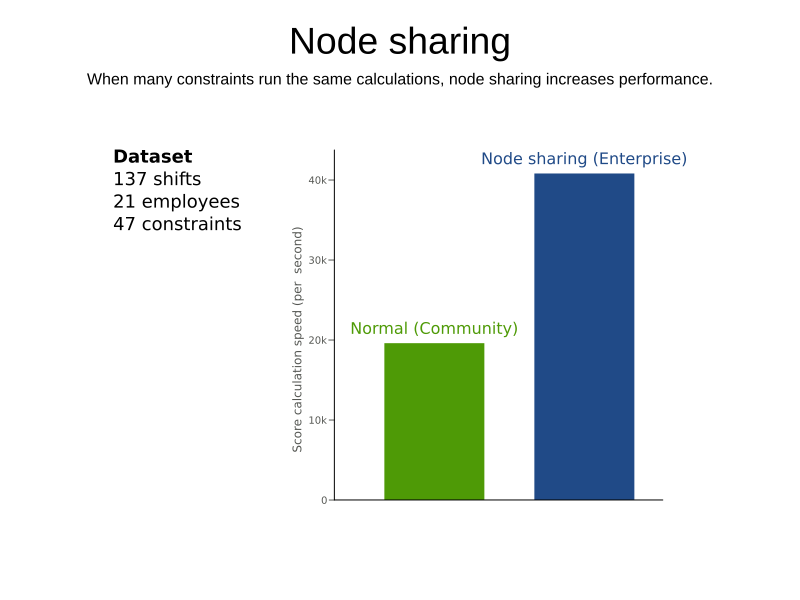
When a ConstraintProvider does an operation for multiple constraints (such as finding all shifts corresponding to an employee), that work can be shared.
This can significantly improve move evaluation speed if the repeated operation is computationally expensive:
Debugging breakpoints put inside your constraints will not be respected, because the ConstraintProvider class will be transformed when this feature is enabled.
|
Restrictions
To use automatic node sharing outside Quarkus, your ConstraintProvider class must oblige by several restrictions so a valid subclass can be generated:
-
The
ConstraintProviderclass cannot be final. -
The
ConstraintProviderclass cannot have any final methods. -
The
ConstraintProviderclass cannot access any protected classes, methods or fields.
Configuration
Node sharing is automatically enabled when running Timefold Solver Enterprise. You can disable the feature by changing the following settings.
-
XML
-
Spring Boot
-
Quarkus
-
Add
<constraintStreamAutomaticNodeSharing>false</constraintStreamAutomaticNodeSharing>in yoursolverConfig.xml:<!-- ... --> <scoreDirectorFactory> <constraintProviderClass>org.acme.MyConstraintProvider</constraintProviderClass> <constraintStreamAutomaticNodeSharing>false</constraintStreamAutomaticNodeSharing> </scoreDirectorFactory> <!-- ... -->
Set the property timefold.solver.constraint-stream-automatic-node-sharing to false in application.properties:
timefold.solver.constraint-stream-automatic-node-sharing=falseSet the property quarkus.timefold.solver.constraint-stream-automatic-node-sharing to false in application.properties:
quarkus.timefold.solver.constraint-stream-automatic-node-sharing=falseWhat is node sharing?
When using constraint streams, each building block forms a node in the score calculation network. When two building blocks are functionally equivalent, they can share the same node in the network. Sharing nodes allows the operation to be performed only once instead of multiple times, improving the performance of the solver. To be functionally equivalent, the following must be true:
-
The building blocks must represent the same operation.
-
The building blocks must have functionally equivalent parent building blocks.
-
The building blocks must have functionally equivalent inputs.
When all of the above is the case, Timefold Solver can rewrite the ConstraintProvider code at runtime to benefit from the performance improvements node sharing brings.